30-day free trial · no credit card required

Your data outgrew Excel.Your workflow doesn't have to.

  • Sick of Excel breaking when you try to work with big files?
  • No time to learn new software?
  • Prefer not to leave Excel?

Just use emuXL.

Fast. Big. Unbreakable.

  • Unmatched speed
  • Powerful engine
  • Secure integration

emuXL works with tens of millions of rows inside the workbook you already have. Your data stays on your machine. No data uploads and no coding to operate.

What emuXL does

The familiarity of Excel, connected to data wherever it lives.

emuXL installs as an add-in and slots into your existing workflow, pairing Excel with plain-English querying and modern data connectivity. There is nothing to re-learn.

Core capability

Connect to data anywhere

Link directly to a warehouse, lake, lakehouse, database or file, on-premises or in your own cloud, and query it from inside Excel.

Productivity

No moving data, no new platform

Analyse, report and model where your data already lives. No exports, no ETL pipeline, no second tool to learn.

Collaboration

One source, many workbooks

Set up a shared local database and let several workbooks query the same data at once. No duplicated files, no version drift.

Flexibility

Excel formulas, UDFs and SQL

Start with the Excel skills you already have. Reach for emuXL functions or SQL when you want more control.

How it works

Four steps. Entirely inside Excel.

No new interfaces and no new software beyond the add-in itself.

  1. 1

    Connect

    Point emuXL at your data wherever it lives, on your machine or your own infrastructure. Nothing moves.

  2. 2

    Query

    Ask in plain English, or use Excel functions, emuXL functions or SQL. Results return at speed regardless of dataset size.

  3. 3

    Return

    Answers land in your spreadsheet exactly where you need them. No copying, pasting or exporting.

  4. 4

    Analyse

    Work the results with the full power of Excel. Model, visualise and report in the environment you already know.

See it in action

Features, at a glance.

Three ways emuXL reaches your data without leaving the workbook you already have.


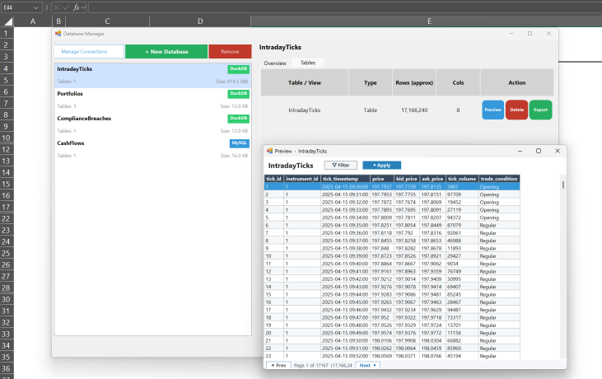
The emuXL Database Manager listing DuckDB and MySQL databases, with a preview of an IntradayTicks table holding 17,166,240 rows.

Millions of rows, inside your workbook

Load datasets far past Excel's row limit and preview them before you query.
  • Connect to DuckDB, MySQL, files and warehouses
  • Browse every table from the Database Manager
  • 17,166,240 rows in a table Excel cannot open
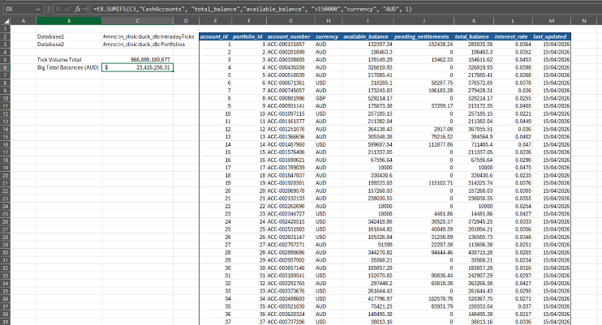
An EX.SUMIFS formula in the Excel formula bar returning a total balance, with the queried table spilled across the worksheet.

The Excel formulas you already know

Query large tables with emuXL functions and let the answers spill straight into the sheet.
  • Functions such as EX.SUMIFS work in the grid
  • Results land exactly where you need them
  • No exports, no copying between tools
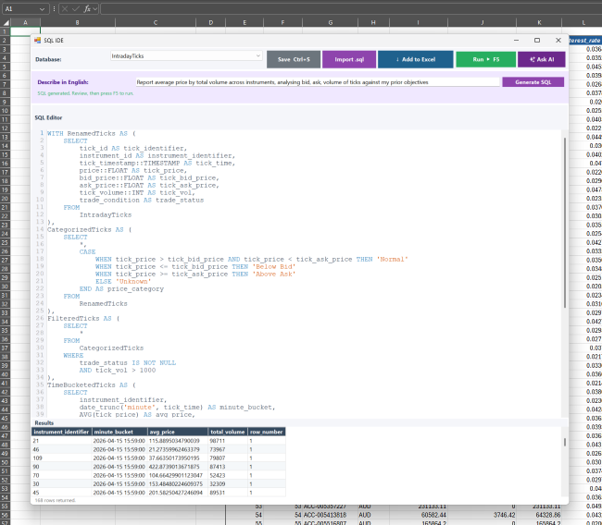
The emuXL SQL editor running a multi-step WITH query against IntradayTicks, with the result set shown beneath the editor.

SQL when you want more control

Write multi-step queries in the built-in editor and keep the heavy lifting in the engine.

  • Full SQL syntax, including WITH clauses
  • Result set shown beneath the editor
  • Send the output back to the worksheet

Who it's built for

If you live in Excel and the data keeps growing, emuXL was built for you.

Built for people who need the reach of a database tool but want to stay in the spreadsheet they already know and trust.

Financial analysts

You build models in Excel every day. When the source data is too large, emuXL brings it within reach without changing your workflow.

Actuaries

Experience studies, claims triangles and experience data run large. emuXL was built by actuaries who hit these limits themselves.

Pricing and data analysts

Large rating datasets, policy extracts and transaction-level data, all queryable from Excel without a trip to the database team.

Teams sharing data across files

One emuXL database, many workbooks. Everyone queries the same source at once, without version drift or duplicated files.

SQL and Python users who deliver in Excel

You have the technical skills but the final output always lands in a spreadsheet. emuXL bridges both without the translation friction.

Reporting and BI analysts

Maintain live Excel reports on large datasets, without the Power BI licence overhead or the DAX learning curve.

Common questions

Frequently asked questions

What is emuXL?
emuXL is a Microsoft Excel add-in that pairs the familiarity of Excel with plain-English querying and modern data connectivity. It connects directly to your data, whether that is a warehouse, lake, lakehouse, database or file, on-premises or in your own cloud, and lets you run Excel formulas, emuXL functions and SQL from inside the workbook.
Does emuXL send my data to the cloud?
No. emuXL does not move your data into its own cloud. Your data stays where it already lives and emuXL queries it in place. When your data is stored locally, no internet connection is required at all. Fewer copies of your data means fewer points of exposure.
How is this different from pasting my data into ChatGPT?
With a general-purpose chat tool, you have to move your data to the model. emuXL works the other way around: the query runs against your data where it sits, and only the answer comes back into your sheet. For anyone working under client confidentiality or data governance obligations, that difference matters. If you have specific governance requirements, check the detail with your own risk and security team before you deploy.
How does emuXL differ from Power Query or Power BI?
Power BI is a capable tool, but it means a new interface, the DAX learning curve and licensing costs once you want to share results. Power Query stays in Excel but can hit performance walls on large-scale joins and aggregations. emuXL is designed to handle scale from inside Excel, with your data staying in its source system and under your control.
Do I need to know SQL?
No. emuXL supports Excel-native formulas, emuXL user-defined functions and plain-English queries, as well as SQL. Start with the Excel skills you already have and reach for SQL only if you want more control.
My data is in a database. Do I need to export CSVs first?
No. Connect directly to the database, explore your data and build reports and dashboards, all within Excel, without exporting or moving anything.
Will it install on a locked-down work machine?
That depends on how your organisation manages add-ins, and it is worth checking early rather than late. Many finance, insurance and audit environments require IT approval before an add-in can be installed. Get in touch and we will send the technical and security documentation your IT team will want to see.
Is emuXL free?
Every new user gets a 30-day free trial with full access and no credit card required. For pricing after the trial, get in touch.